Installing,Configuring and Customizing Zsh on Linux
Definition of shell from Wikipedia:
A Unix shell is a command-line interpreter or shell that provides a traditional user interface for the Unix operating system and for Unix-like systems. Users direct the operation of the computer by entering commands as text for a command line interpreter to execute or by creating text scripts of one or more such commands.
Most fresh installation of Linux comes pre-loaded with Bash shell. Personally i like zsh, and it's my favorite shell that i use all the time.
Why Zsh?
Zsh does a bunch of other useful things that bash alone won't accomplish.
Apart from being a powerful scripting language, Zsh is a shell designed for interactive use.It incorporates into it many useful features of Bash, ksh, and tcsh.Othe additional features provided by zsh are:
How to install Zsh on Arch Linux and Manjaro
Non-root account,
![]()
Install Oh My Zsh to set zsh theme. Oh My Zsh is an open source, community-driven framework for managing your zsh configuration.It comes with load of plugins and themes to take advantage of. Install it as below.
Prerequisites:
![]() You can also take a look in the plugins directory to see all plugins available.
You can also take a look in the plugins directory to see all plugins available.
![]() We'll install my favorite theme to ~/.oh-my-zsh/themes/ and configure .zshrc to use it.
We'll install my favorite theme to ~/.oh-my-zsh/themes/ and configure .zshrc to use it.
![]() Save changes and exit. Type CTRL+X, Then Y.
Save changes and exit. Type CTRL+X, Then Y.
Source ~/.zshrc file
![]()
Save and exit, the source it.
I will assume you already installed oh-my-zsh, if not refer to it above.
![]() To enable the famous zsh tab-completion system, you need to add above commands ( autoload -U compinit && compinit).
To enable the famous zsh tab-completion system, you need to add above commands ( autoload -U compinit && compinit).
If you are running Arch Linux, you can install it using Pacman package manager. This has an advantage of getting updates for it automatically.
To unistall oh-my-zsh type
Zsh is the most customizable shell i have ever used. It's easy to install and customize with more than 100 themes. There are plenty of plugins to extend its functionality with frameworks like oh-my-zsh. Zsh is worth your time and i think you should give it a try.
Definition of shell from Wikipedia:
A Unix shell is a command-line interpreter or shell that provides a traditional user interface for the Unix operating system and for Unix-like systems. Users direct the operation of the computer by entering commands as text for a command line interpreter to execute or by creating text scripts of one or more such commands.
Most fresh installation of Linux comes pre-loaded with Bash shell. Personally i like zsh, and it's my favorite shell that i use all the time.
Why Zsh?
Zsh does a bunch of other useful things that bash alone won't accomplish.
Apart from being a powerful scripting language, Zsh is a shell designed for interactive use.It incorporates into it many useful features of Bash, ksh, and tcsh.Othe additional features provided by zsh are:
- Auto Completions are case insensitive much faster than bash.
- All sorts of bells and whistles made possible by community driven framework like oh-my-zsh.
- Support multi-line editing
- Recursive file globbing
- Highly compatible with ksh.
- Zsh has huge collection of better themes.
- Simple configuration style
- Output redirection to multiple destinations
How to install Zsh on Arch Linux and Manjaro
sudo pacman -S zshHow to install Zsh on Gentoo
emerge --ask zshHow to install Zsh on Ubuntu and Debian based systems.
sudo apt-get install zshHow to install Zsh on Fedora 23
sudo dnf install zshHow to install Zsh on Fedora 22 and below
yum install zshHow to install Zsh on CentOS and RHEL
yum install zshConfirm it's installed and see list of installed shells.
zsh --versionAfter you've installed it, we need to make it our default shell and customize it to get extra eye-candy.We'll change shell for both root and standard user account.
chsh -l
Non-root account,
usermod username -s /usr/bin/zshor
chsh -s /usr/bin/zsh usernameRoot account:
su -Then,
chsh /usr/bin/zsh

Install Oh My Zsh to set zsh theme. Oh My Zsh is an open source, community-driven framework for managing your zsh configuration.It comes with load of plugins and themes to take advantage of. Install it as below.
Prerequisites:
- Wget
- curl
- git
sh -c "$(wget https://raw.github.com/robbyrussell/oh-my-zsh/master/tools/install.sh -O -)"Once installed, you'll get a bundle of themes that comes with it, located at ~/.oh-my-zsh/themes/
ls -l ~/.oh-my-zsh/themes/

ls -lh ~/.oh-my-zsh/plugins

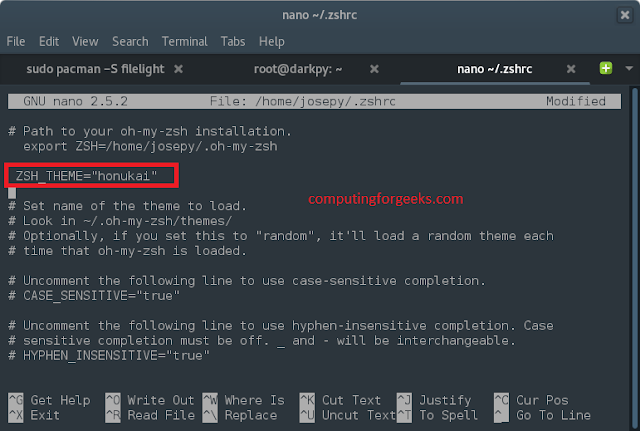
cd ~/.oh-my-zsh/themes/Modify theme variable name to ZSH_THEME="honukai" in ~/.zshrc
git clone https://github.com/oskarkrawczyk/honukai-iterm-zsh.git
cp honukai-iterm-zsh/honukai.zsh-theme ~/.oh-my-zsh/themes/
nano ~/.zshrcSee screenshot below,
Source ~/.zshrc file
source ~/.zshrcConfigure Help command.
nano ~/.zshrcAdd the following lines to the end.
autoload -U run-helpSource it and you're good to go.
autoload run-help-git
autoload run-help-svn
autoload run-help-svk
unalias run-help
alias help=run-help
source ~/.zshrcFish-like syntax highlighting (Optional)
nano ~/.zshrcAdd below line at the end,
source /usr/share/zsh/plugins/zsh-syntax-highlighting/zsh-syntax-highlighting.zshThen source zshrc file
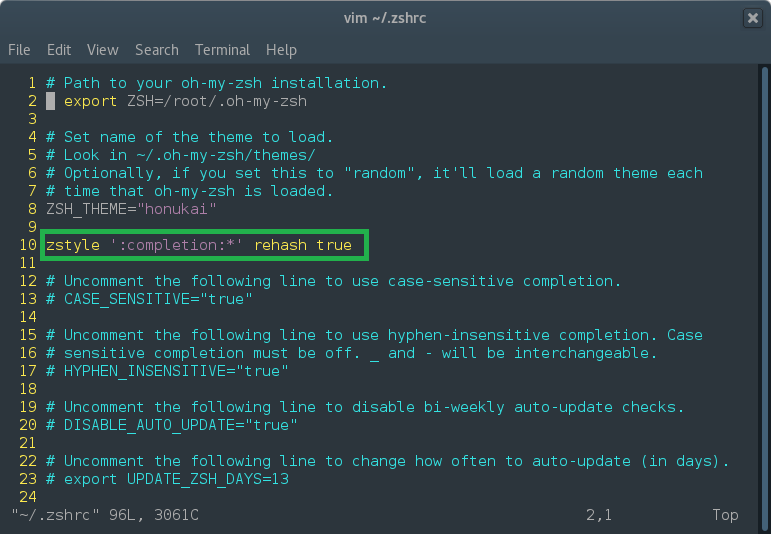
source ~/.zshrcPersistent rehash: This allow compinit to automatically find new executables in the $PATH.
nano ~/.zshrcAdd line:
zstyle ':completion:*' rehash true
Save and exit, the source it.
source ~/.zshrcConfigure additional zsh-completions, applicable to all Linux systems.
I will assume you already installed oh-my-zsh, if not refer to it above.
git clone https://github.com/zsh-users/zsh-completions~/.oh-my-zsh/custom/plugins/zsh-completionsThen enable it in your .zshrc
nano ~/.zshrcAdd
plugins+=(zsh-completions)
autoload -U compinit && compinit

If you are running Arch Linux, you can install it using Pacman package manager. This has an advantage of getting updates for it automatically.
pacman -S zsh-completionsInstalling zsh-completions on Gentoo
emerge --ask zsh-completionsWhen you use pacman and emerge, it will enable it automatically on zshrc file.
To unistall oh-my-zsh type
rm -rf ~/.oh-my-zshConclusion
Zsh is the most customizable shell i have ever used. It's easy to install and customize with more than 100 themes. There are plenty of plugins to extend its functionality with frameworks like oh-my-zsh. Zsh is worth your time and i think you should give it a try.