For one reason or another, you may reach a point where you need additional storage for your Virtual Machine. Today, i will show show a simple way to Add an extra hard disk to Virtual Machine running on VirtualBox and create a mount point for it. We'll also make the disk added auto-mount as the VM is booting up. I have a nice tutorial on How to get latest VirtualBox and Update it easily:
![]()
![]()
![]()
![]()
![]()
![]()
![]()
![]()
![]()
Tags:
How to add extra Hard disk to VirtualBox and make it Mount on boot
Hard Disk /dev/sdb set mount point
Openstack Swift Add hard drives; VirtualBox Lab Test
How to install Virtualbox Latest on Ubuntu and Kali Linux
You can also use this guide as reference when building Openstack Swift object storage service inside VirtualBox, for a Bare Metal server, with more than One Hard drive.
Follow steps below:
- Open VirtualBox GUI
- Click on VM name, VM that you want to add disk to.
- Go to its Settings
- Click on Storage
- Click on Controller: SATA controller
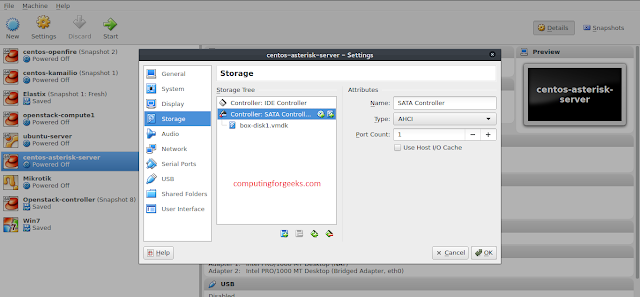
- Click on Adds Hard disk icon
- Click on Create new disk

- Choose VDI ( You can choose any disk format you want to use)

- Select Dynamically allocate ( You can use fixed as well)

- Specify the name of the disk and size

- Click on create button at the bottom
Your disk should be added successfully under SATA controller, see below

Now that hard disk has been added successfully, let's start VM and create partition. Type lsblk command to confirm:

You'll have to install tools needed to partition, Install this on Virtual Machine appliance.
Debian/Ubuntu systems
apt-get install xfsprogs rsync
RHEL/CentOS/Fedora
yum install xfsprogs rsync
Arch Linux
pacman -S xfsprogsFrom my lsblk, the disk added is at /dev/sdb. Format the /dev/sdb devices as XFS:
mkfs.xfs /dev/sdb

Create the mount point directory structure:
mkdir -p /srv/node/sdb
Edit the /etc/fstab file
vi /etc/fstab
Add the following to it:
/dev/sdb /srv/node/sdb xfs noatime,nodiratime,nobarrier,logbufs=8 0 2Mount the device:
mount /srv/node/sdbRun lsblk again, you should see /dev/sdb mounted.

Tags:
How to add extra Hard disk to VirtualBox and make it Mount on boot
Hard Disk /dev/sdb set mount point
Openstack Swift Add hard drives; VirtualBox Lab Test